
Popular tools
The three documents service businesses open first. Each one is a free template today — printable PDF plus an editable file, no sign-up.
Invoice
The cleaning service invoice template: line items that match your estimate, totals, tax line and payment details.
Open the invoice template →Estimate
Price the job room by room, itemise the add-ons, and leave space for the client’s signed acceptance.
Open the estimate template →Receipt
Paid invoices double as the client’s receipt — the invoice template’s payment block records how and when they paid.
See the payment block →Browse by industry
Complete, matched collections — we publish one trade at a time, and only when the full set is ready.
Cleaning business
14 documents live — the complete lifecycle, from welcome sheet to supplies tracker.
Browse cleaning templates →Pet sitting & dog walking
7 documents live — one booking run properly, from intake to incident record.
Browse pet sitting templates →Browse by document type
Looking for one specific form? Start from the document, not the trade.
Invoices & estimates
Intake & welcome forms
Work orders & schedules
Logs & records
Popular downloads
The cleaning set’s most-downloaded documents — the full matched chain, from first intake to final invoice.
Cleaning Client Intake Form
For cleaning businesses — complete at sign-up or first visit, then keep on file.
Get the template →Move-Out Cleaning Checklist
For cleaning businesses — the room-by-room standard for an end-of-tenancy clean, with a walkthrough record.
Get the template →Cleaning Service Estimate Form
For cleaning businesses — price the job room by room, add-ons itemised, acceptance signed.
Get the template →Deep Cleaning Checklist
For cleaning businesses — the full-detail standard for a first or one-off deep clean.
Get the template →House Cleaning Checklist (Per-Visit, for Businesses)
For cleaning businesses — the recurring-visit standard, with rotation tasks and a visit record.
Get the template →Cleaning Service Work Order
For cleaning businesses — turns an accepted estimate into a scheduled, assigned, completable job.
Get the template →Cleaning Service Invoice Template
For cleaning businesses — line items that match the estimate and work order, totals, and payment details.
Get the template →Recurring Cleaning Schedule (Client-Visit Planner)
For cleaning businesses — the weekly planner: which client, which day, which team.
Get the template →Connected workflows
Four documents, one job. The intake captures the client once; the estimate prices the work; the work order schedules it; the invoice bills it — the same client block and the same job reference throughout, so nothing gets typed twice.
Spreadsheet templates
Real working .xlsx files — open them in Excel or Google Sheets and start typing.
Latest additions
The pet sitting & dog walking collection — seven documents that run one booking from intake to invoice: report card, client & pet intake, care instructions, booking schedule, key log, invoice and incident record.
Pet Sitter Visit Report Card
For pet sitters and dog walkers — the short record completed after each visit and sent to the client. One card per visit.
Get the template →Pet Sitting Client & Pet Intake Form
For pet-sitting businesses — the client, pet, veterinary, emergency-contact and home-access information collected before the first visit.
Get the template →Pet Care Instructions Sheet
For pet-sitting businesses — the sitter-ready handover sheet prepared from the intake: routines per pet, a dated medication record, and access instructions by reference.
Get the template →Pet Sitting Booking & Visit Schedule
For pet-sitting businesses — the master schedule for one booking: every visit dated, referenced, assigned and marked complete only when it has actually happened.
Get the template →Pet Sitter Key & Home-Access Log
For pet-sitting businesses — the restricted record of client keys and access: received, held, transferred and returned, by coded reference only.
Get the template →Pet Sitting Invoice
For pet-sitting businesses — an itemised invoice built from completed visits: one line per visit, each carrying its schedule reference.
Get the template →Pet Sitting Incident & Emergency Record
For pet-sitting businesses — the factual, time-stamped record of anything unusual during a booking: what happened, what was done, who was told, and how it ended.
Get the template →How it works
1 · Find the document
Search the library or browse by industry or document type. Every template page shows the full document before you download anything.
2 · Download the file
PDF to print as-is, Word to edit, Excel to calculate in. One click — no account, no email gate, no watermark.
3 · Use it in your business
Add your own name and details and put it to work. Templates in a set share the same fields, so the next document is half-filled already.
Why matched sets?
One client, entered once
The intake captures it; every later document reuses the same fields in the same order. No contradictions between the estimate and the invoice.
Built for the job, not the filing cabinet
Every template was scored for real demand, checked against what already exists, and designed to fix the flaws of the incumbents — thin fields, missing sections, no worked example.
Honestly free
No email gate, no watermark, no “free trial”. Download, print, use it in your business. If a template earns its keep, the set it belongs to is here when you need the next document.
How we choose, check and maintain templates is written down in our editorial policy. Every download is free for your own business use — the licence is stated plainly on each template page.
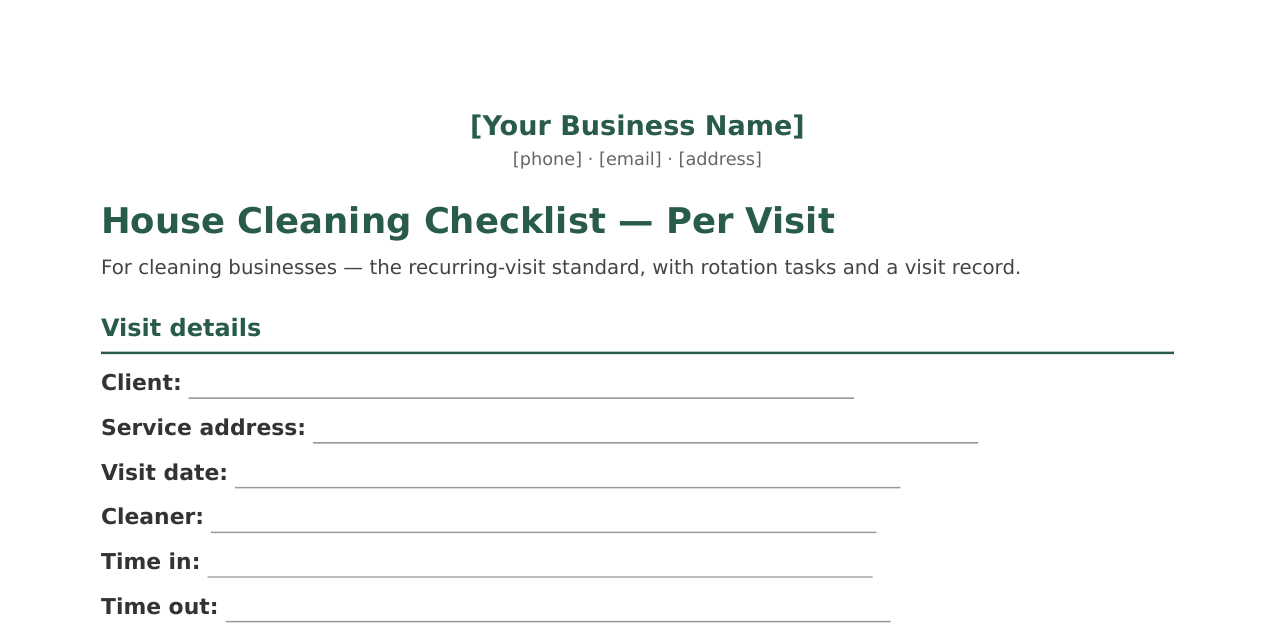
A template, exactly as it downloads
No mockup — this is a preview of the top of page one of the House Cleaning Checklist PDF, rendered from the same file the download button hands you: blank fields, tick boxes and all, ready to print.
Questions
Are these templates really free?
Yes. Every download is free — no account, no email gate, no watermark and no “free trial” that turns into a bill. Print them, fill them in, use them in your business.
Do I need to sign up or give my email?
No. There is no sign-up on FormShelf at all. Click the download button and the file is yours.
Which formats do the templates come in?
Most templates come as a print-ready PDF and an editable Word (DOCX) file you can open in Word or Google Docs. The supplies tracker also comes as an Excel (XLSX) spreadsheet. The formats are labelled beside every download button.
Can I put my own business name on them?
Yes — that is what they are for. The letterhead block on each document is a placeholder for your own business name and details. The files themselves stay ours: please don’t resell or redistribute the templates as your own product.
Are these legal documents?
No. FormShelf templates are free general-purpose business documents, not legal, tax or accounting advice. If a document affects your legal position, have it checked by a qualified professional in your area.